Templates / Couples' Money Tracker
Couples' Money Tracker
One place for the two of you to log shared spending, split it the way you've agreed, and see who owes whom. No daily entry limits, no ads and no subscription.
- Google Sheets and Excel, no macros
- One-time purchase for both of you
- Lifetime updates for this version
- 14-day refund if it doesn't work for you
What it does
A fair split for every kind of spending, and a running balance that settles itself.
A split rule for each category
Rent by income, groceries 50/50, a hobby 100% the person who enjoys it, or any custom percentage. Each transaction follows its category's rule.
Who owes whom
One plain sentence at the top of Settle Up, such as "Alex owes Sam $68.03", net of everything you've logged and paid back. Log the transfer and it resets.
Income-change rebalance
Parental leave, a raise or a move to part-time? Add the new income and its start date. "By income" splits from that day use the new ratio; earlier ones stay as they were.
Joint-account transfer calculator
How much each of you would move into the joint account under your chosen split, per month and per payday (weekly, biweekly, twice-monthly or monthly), with 50/50, by income and your category rules side by side.
Shared goals and bills
Up to six goals with each partner's monthly share and progress bars, plus recurring bills and subscriptions with who pays each.
A 15-minute money date
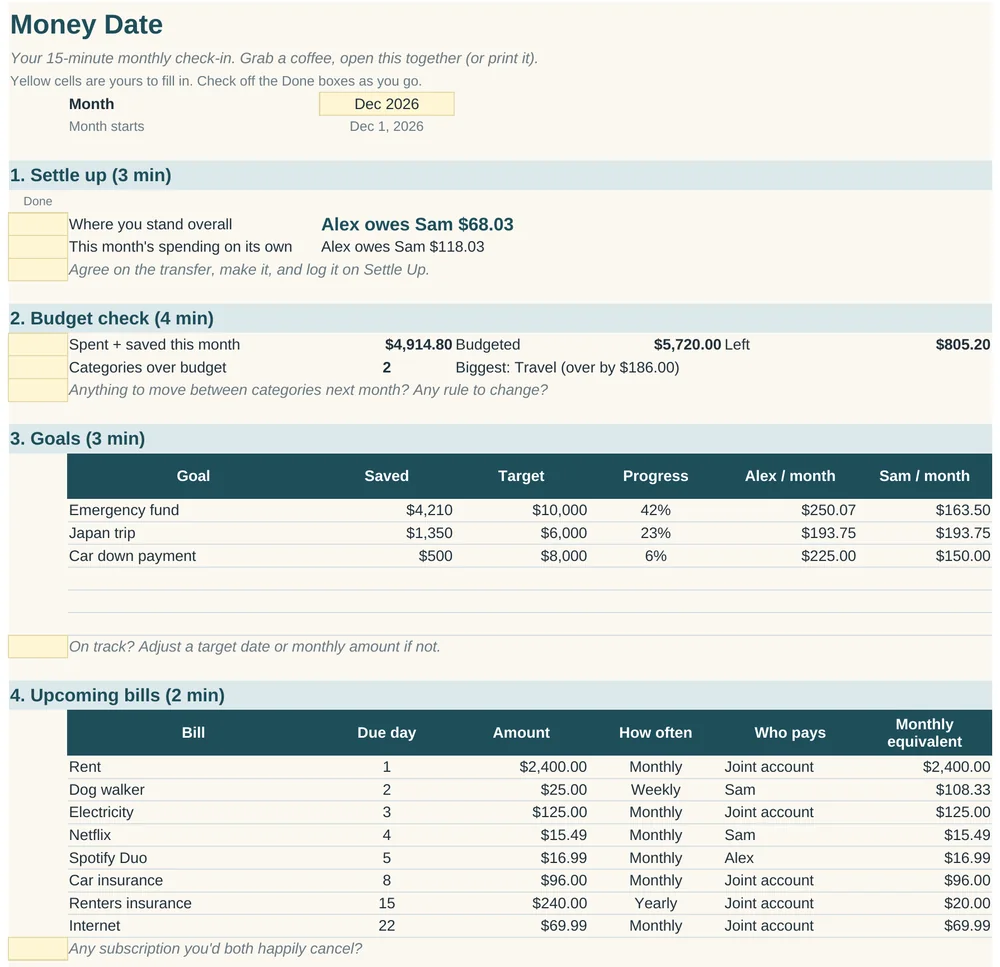
A printable monthly agenda: settle up, check the budget, look at goals, glance at bills, talk through big purchases. A check-in, not an audit.
Who it's for
Couples who want fairness without keeping score in their heads.
- Different incomesSplit by income so you each pay the same share of what you earn.
- Yours, mine and oursWorks with a joint account plus personal accounts, or no joint account at all.
- Tired of app limitsLog as many expenses a day as you like, from either phone.
What's inside
12 tabs in one .xlsx file, shipped with example data for "Alex and Sam" so you can see it working first. Yellow cells are yours; formulas are locked (no password) so neither of you can overwrite one by accident.
| Tab | What it's for |
|---|---|
| Start Here | Quick start, sharing it in Google Sheets, and FAQ. |
| Settings | Names, take-home incomes (with change dates), default split, talk-first threshold and currency symbol. |
| Categories | Split rule, custom %, monthly budget and joint-funded flag for each category. |
| Transactions | The log: date, description, category, amount, who paid. Phone-friendly, with a Check column that flags typos. |
| Settle Up | Running balance, month-by-month view and a log of pay-back transfers. |
| Joint Account | What each of you transfers per month and per payday (biweekly, monthly and more), with a what-if comparison. |
| Budget | Planned vs actual for any month, with over-budget categories highlighted, and the 12 months up to it. |
| Goals | Up to six shared goals, a contributions log and the monthly amount needed. |
| Bills | Recurring bills and subscriptions with monthly equivalents per partner. |
| Money Date | The printable monthly agenda. |
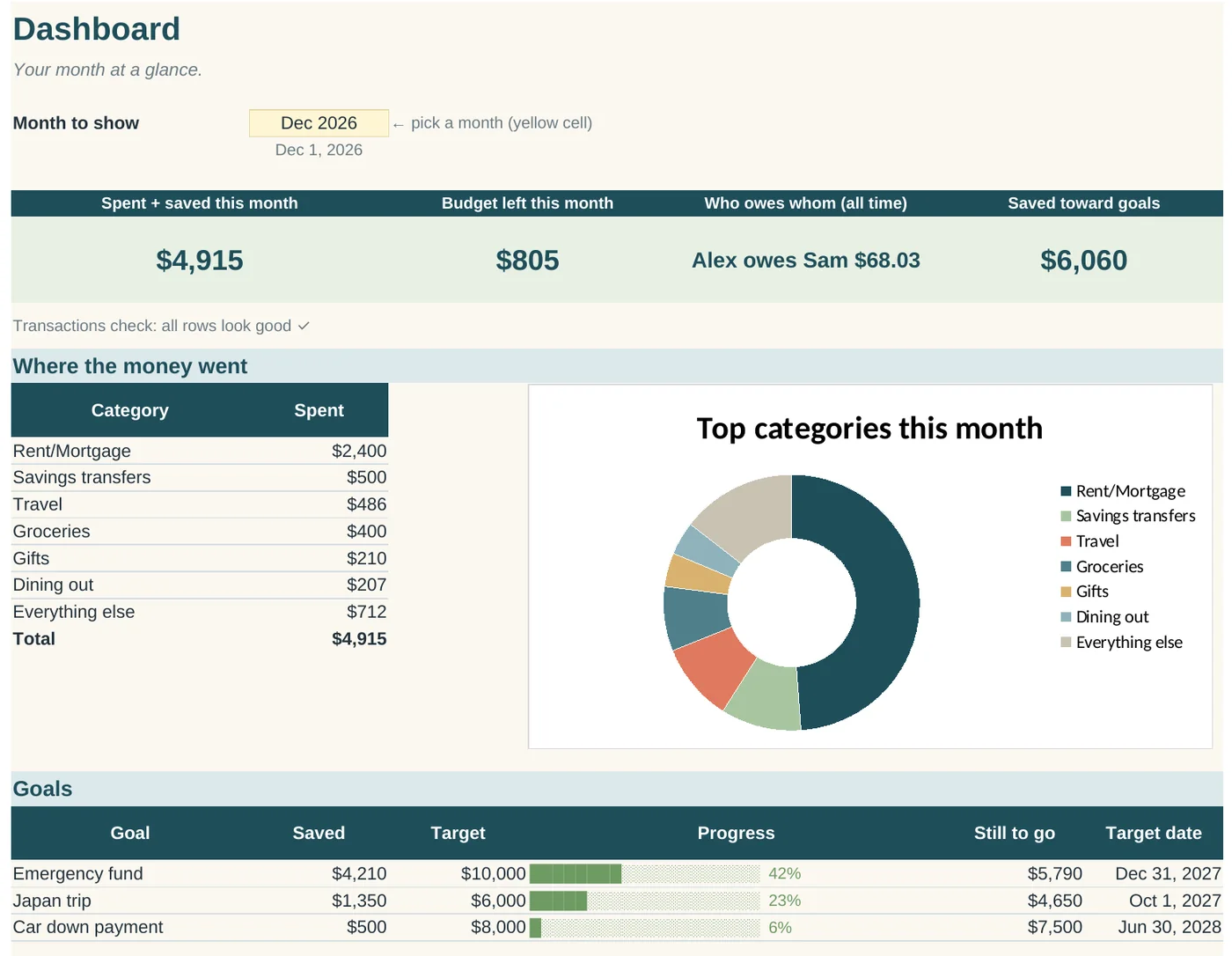
| Dashboard | This month at a glance, top categories, goals and a 6-month trend. |
| Lists | Dropdown options. You rarely need to touch it. |
Questions about the couples tracker
Can we both use it?
Yes, that's the point. Save it as a Google Sheet and share it with your partner as an editor, and you can both log from the Google Sheets phone app. In Excel, keep it on OneDrive and share the link so you're editing one file, not two copies.
What's the fairest way to split?
There isn't one right answer. 50/50 is simple but can squeeze the lower earner. By income means you each pay the same percentage of take-home pay. Many couples mix them by category. The Joint Account tab compares 50/50, by income and your own category mix with your numbers.
What if someone pays from the joint account?
Choose "Joint account" as the payer. Nobody owes anybody for that purchase, because you both fund the account.
What if one of us types something wrong?
The Check column on Transactions flags a row when the amount is text instead of a number, nobody is picked as the payer, or the date can't be read. Flagged rows stay out of the totals until fixed, and the Dashboard and Settle Up tell you how many there are.
Does it work outside the US?
Yes. Change the currency symbol on Settings for the written summaries, and switch number cells with Format > Number > Currency.
Is there a limit on how many expenses we can log?
No daily limits. The Transactions tab has room for 500 rows.
An educational tool for organizing your own numbers. Not financial, legal or tax advice, and it can't tell you how to split your money. That's for the two of you to decide.
The Steady Bundle
All three templates for $39. Separately they come to $51 at launch prices, or $60 regular. Handy if you host, are paying something down, and share costs with a partner, or if you want one to give away.
Three .xlsx files. Google Sheets and Excel.
Coming soon: The Steady Bundle