Templates / Debt Payoff Planner
Debt Payoff Planner
List your debts and your monthly budget. The planner builds a month-by-month plan, puts your debt-free date front and center, and warns you before a 0% promo rate runs out.
- Google Sheets and Excel, no macros
- Instant download, no subscription
- Lifetime updates for this version
- 14-day refund if it doesn't work for you
What it does
Up to 20 debts, a 30-year engine and every number on one dashboard.
Four ways to order your debts
Snowball (smallest balance first), avalanche (highest rate first), your own custom order, or promo-aware, which clears balances with a promo ending soon before the rate jumps.
Your debt-free date, clearly
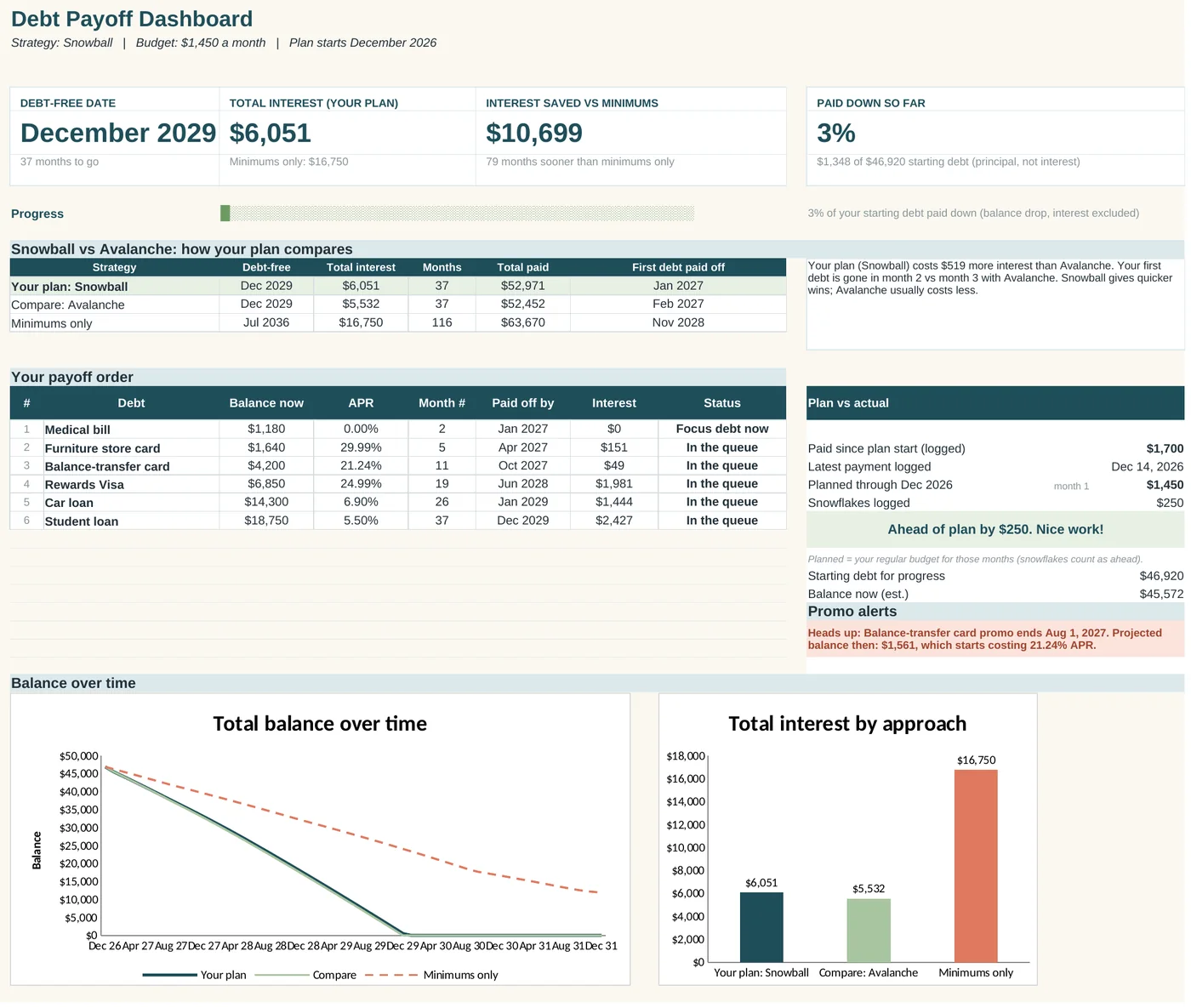
The month you'll hit $0, total interest, months to go and interest saved compared with paying minimums only. Your plan sits next to a comparison (avalanche, or snowball if you picked avalanche or a custom order) so you can choose with real numbers.
0% promo deadline alerts
Enter a promo rate and end date for any balance transfer or intro-rate card. If a balance is projected to be left when the promo ends, the dashboard tells you how much, and what rate it moves to.
"Debt-free by" goal seek
Pick the month you want to be done. Goal Seek estimates the monthly budget it takes and shows a ladder of budgets and their payoff dates.
Plan vs actual
Log real payments, including one-off "snowflake" extras like a tax refund. The dashboard shows whether you're ahead of or behind plan, and by how much. If your budget is below your minimums, it says so instead.
A printable coloring tracker
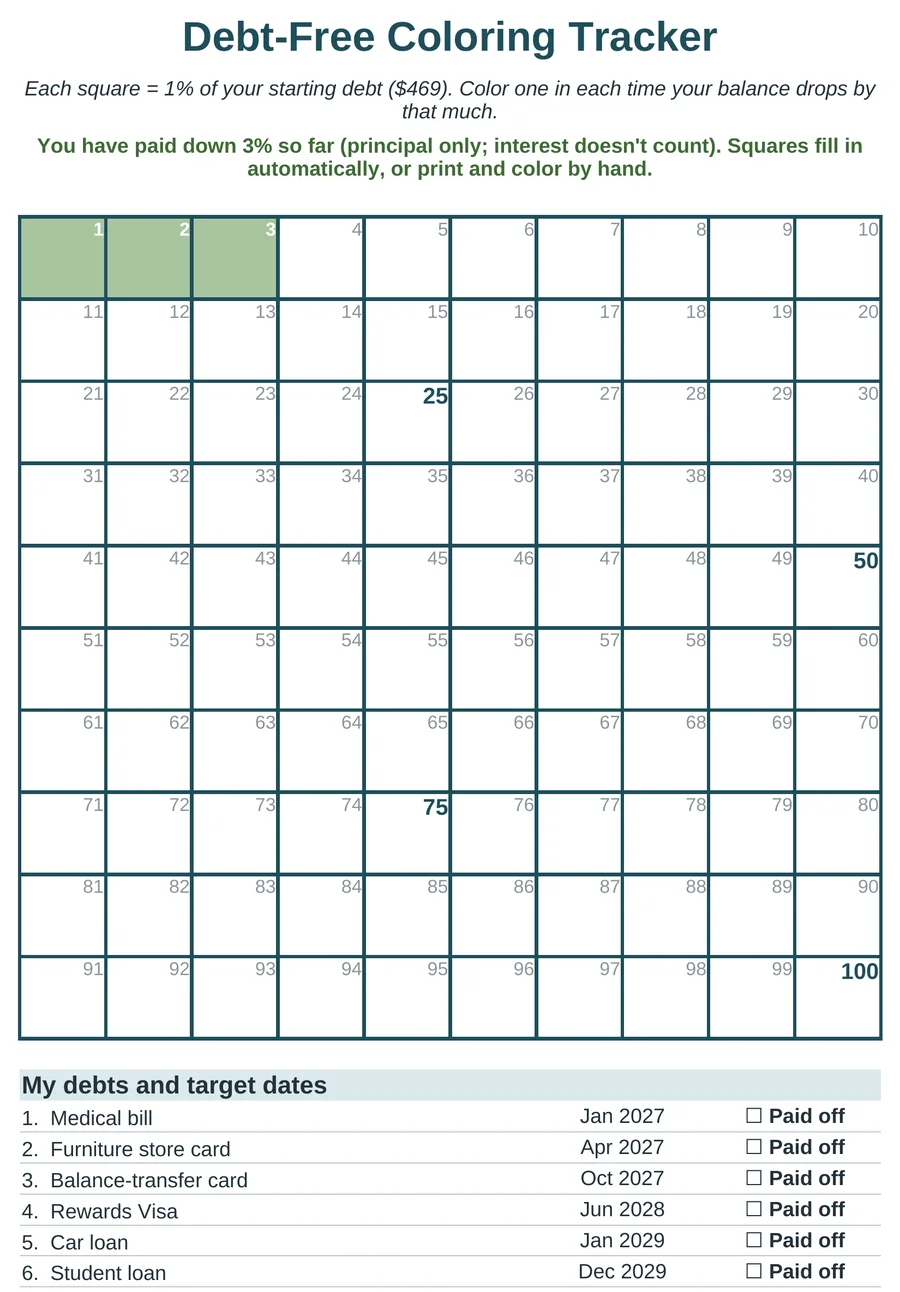
100 squares, each worth 1% of your starting debt paid down. Progress counts principal only, so interest never looks like progress. It fills in by itself, or print it and color by hand.
Who it's for
Anyone who wants a plan they can see, without signing up for another app.
- Credit cards, store cards and loansCar loans, student loans, medical bills: up to 20 debts in one plan.
- Balance-transfer jugglingPromo end dates are built in, not bolted on.
- People who like to see progressPaid-off debts stay listed with a celebration tag, and the coloring chart is made for the fridge.
What's inside
9 tabs in one .xlsx file. You type into three of them; the rest update by themselves and are locked (no password) so a formula can't be overwritten by accident.
| Tab | What it's for |
|---|---|
| Start Here | Quick start, how the plan decides the order, and FAQ. |
| My Debts | Plan start month, monthly budget and strategy, then your debts (balance, APR, minimum, optional promo rate and end date). Values that aren't numbers are flagged. |
| Dashboard | Debt-free date, interest, comparison, payoff order, promo alerts, principal paid down, plan vs actual and charts. |
| Payment Log | Record real payments. Mark one-off extras as snowflakes. Rows it can't count are flagged. |
| Goal Seek | Type a target month and see an estimate of the monthly budget it takes, plus a budget ladder. |
| Coloring Tracker | Print-ready 100-square chart (each square = 1% of your starting debt paid down) with target dates. |
| Plan | The month-by-month engine for your chosen strategy. Read-only. |
| Compare | The same engine for a comparison strategy (avalanche, or snowball if you chose avalanche or custom order) plus a minimums-only run. Read-only. |
| Lists | Dropdown options, such as debt types. |
Questions about the debt planner
Snowball or avalanche?
Snowball pays the smallest balance first, so you get quick wins. Avalanche pays the highest rate first, which usually costs less overall. The dashboard shows both with your real numbers. The best plan is the one you'll stick with.
How does it handle 0% balance transfers?
Enter the promo rate and the date it ends. The plan uses the promo rate until then and the regular rate after. If a balance is projected to remain when the promo ends, you'll see an alert. Deferred-interest store cards (which back-charge interest) aren't modeled, so aim to clear those before the deadline.
How do I keep it up to date?
Log payments as you make them. Every month or so, update each balance from your statements and move the plan start month forward; the plan recalculates from where you really are.
How is progress measured?
By principal paid down: your starting debt minus your balance now. Interest you pay never counts as progress, so the coloring squares and "paid down so far" only move when your balances really drop.
What if I type something wrong?
The sheet checks for common slips. A balance, APR or minimum pasted as text (like "6,850 dollars") is shown in coral as "Check this value" instead of quietly counting as paid off. An APR typed as 24.99 is read as 24.99%, with a note. Payment Log rows with a date or amount it can't read are counted and flagged, so you can fix them.
How accurate is it?
It estimates interest monthly (APR ÷ 12). Your lender may calculate daily, so real numbers can differ a little. Goal Seek is an estimate too, usually within about a month of the exact plan.
Can I use it on my phone?
Yes, in the Google Sheets app. The Payment Log keeps its entry columns first so logging a payment takes a few taps.
An educational tool. All results are estimates. Not financial advice.
The Steady Bundle
All three templates for $39. Separately they come to $51 at launch prices, or $60 regular. Handy if you host, are paying something down, and share costs with a partner, or if you want one to give away.
Three .xlsx files. Google Sheets and Excel.
Coming soon: The Steady Bundle